
Why Getting Your Bird Photography Settings Canon Right Changes Everything
Bird photography settings Canon cameras use can make the difference between a blurry, unusable shot and a razor-sharp image that stops people in their tracks.
Here are the core settings to start with on your Canon camera for bird photography:
| Setting | Perched Birds | Birds in Flight |
|---|---|---|
| Mode | Aperture Priority (Av) | Aperture Priority (Av) or Manual |
| Shutter Speed | 1/500s minimum | 1/2000s–1/4000s |
| Aperture | f/6.3–f/7.1 | f/5.6–f/7.1 |
| ISO | As low as possible | Auto ISO, max 1600–3200 |
| AF Mode | AI Servo AF | AI Servo AF |
| AF Area | Single-point or Expand | Zone AF or Face+Tracking |
| Drive Mode | Single or Continuous | High-speed Continuous |
| Back-Button AF | Enabled (AF-ON) | Enabled (AF-ON) |
Birds don’t wait for you to fiddle with dials. They land, they launch, they turn — all in a split second.
That’s what makes bird photography genuinely hard for beginners. Your gear is capable of stunning results, but only if your settings are dialed in before the bird shows up.
The good news? You don’t need a $6,000 camera body. Even entry-level Canon DSLRs and mirrorless cameras can produce incredible bird photos when set up correctly. One key insight from working photographers: most amateurs miss a huge portion of their camera’s potential simply by not enabling back-button autofocus with AI Servo mode.
This guide walks you through every setting that matters — from autofocus to exposure to lens technique — so your Canon is ready the moment a kingfisher dives or a heron takes flight.
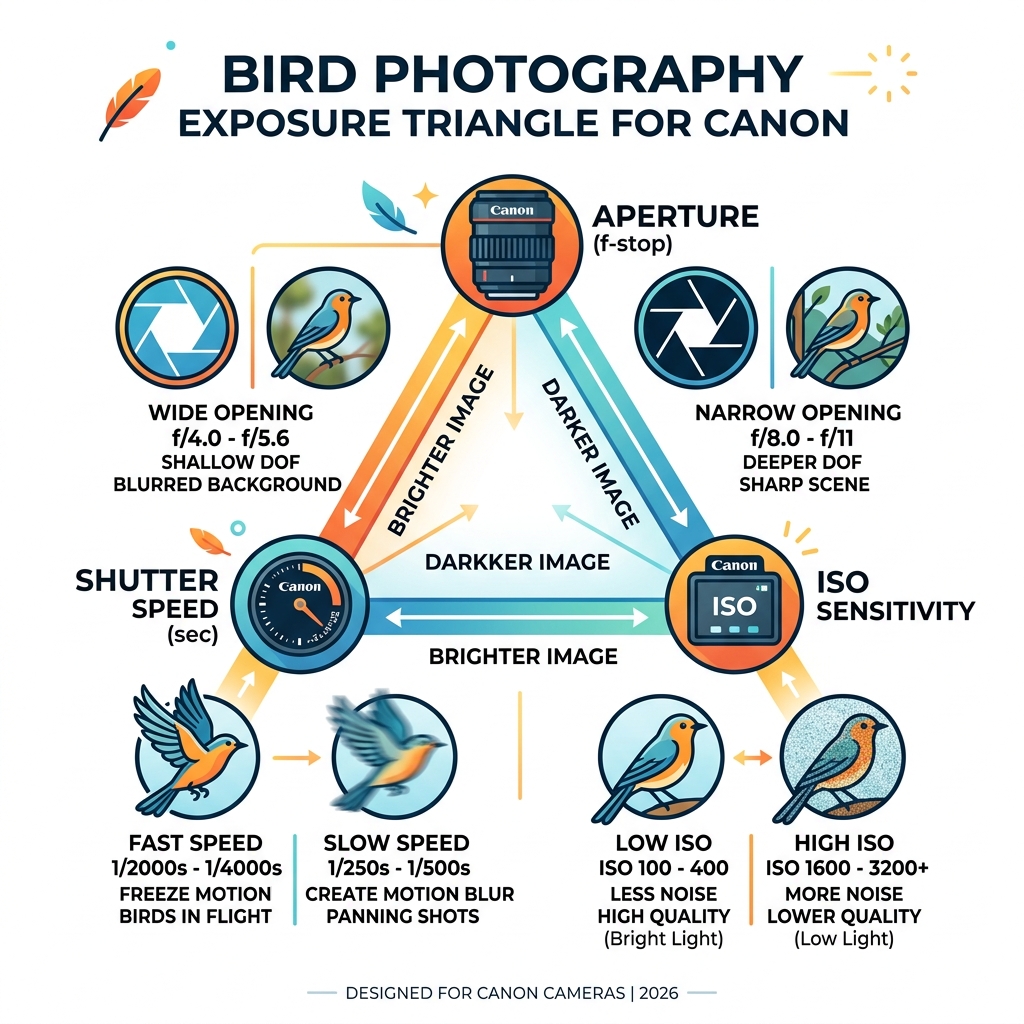
Essential Bird Photography Settings Canon Users Need
When we head out into the field, our goal is to eliminate as many variables as possible. Birds are unpredictable; our cameras shouldn’t be. To achieve this, we need to master the exposure triangle specifically for wildlife.

For most scenarios, we recommend using Aperture Priority (Av) mode. Why? Because in the world of birding, Manual mode can sometimes be too slow. If a bird moves from a bright branch into a dark thicket, Aperture Priority allows the camera to instantly adjust the shutter speed while you maintain control over the depth of field. However, if the lighting is consistent, Manual mode with Auto ISO is a fantastic way to “lock in” your desired shutter speed and aperture.
Shutter Speed and Aperture
A common mistake is shooting “wide open” (the lowest f-number your lens allows). While an f/4 or f/5.6 aperture creates a beautiful bokeh background, it often results in a “soft” bird where only the eye is sharp but the beak or feathers are blurry. We suggest stopping down slightly to f/7.1 or f/8. This provides enough depth of field to keep the entire bird crisp.
To freeze motion, your shutter speed is king. For a stationary owl, 1/500s might suffice. But for a small, twitchy songbird or a raptor in flight, you’ll need at least 1/2000s to 1/4000s. We’ve found that mastering-camera-settings-for-bird-photography involves a constant dance between ISO and shutter speed to ensure no motion blur ruins the shot. Check out The best camera settings for bird photography for more on balancing these technical trade-offs.
Optimizing Bird Photography Settings Canon Mirrorless (R5/R6)
If you are using the newer mirrorless systems like the Canon EOS R5 or R6, you have access to “game-changing” technology: Animal Eye AF. This feature uses deep-learning AI to detect and track the eyes of birds, even when they are moving erratically.
To get the most out of this, we suggest these specific tweaks:
- Subject to Detect: Set this to “Animals.”
- Eye Detection: Enable this to ensure the focus sticks to the eye rather than the wingtip.
- Servo AF Cases: For birds in flight, use Case 2 (to ignore obstacles) or Case 3 (for subjects that accelerate suddenly). Case 2 is particularly helpful when a bird flies behind a few stray branches; the focus won’t immediately “jump” to the foreground.
- Initial Servo AF Point: We recommend setting the camera to start searching for focus at a specific point you choose, rather than letting the camera guess across the entire frame.
For a deep dive into these high-end bodies, Improve Your Bird Photos: How to Set Up a Canon R5 for Optimal Results offers a great roadmap for menu navigation.
Recommended Bird Photography Settings Canon for Flight vs. Perched
The way we handle a perched heron is vastly different from how we track a diving kingfisher. We need to be able to switch mental (and camera) gears instantly.
| Scenario | Shutter Speed | Drive Mode | AF Area |
|---|---|---|---|
| Perched (Resting) | 1/500s – 1/1000s | Low-speed Continuous | Single-point AF |
| Perched (Active/Singing) | 1/1250s – 1/1600s | High-speed Continuous | Expand AF Area |
| In Flight (Large Birds) | 1/2000s – 1/2500s | High-speed Continuous+ | Zone AF / Face Tracking |
| In Flight (Small/Fast) | 1/3200s – 1/4000s | High-speed Continuous+ | Whole Area AF |
One tip we always emphasize: even if a bird is perched, use a high-speed burst. Birds blink and twitch their heads constantly. By taking a burst of 5-10 shots, you increase the odds that at least one frame has the perfect “catchlight” in the eye. This is a primary strategy for avoiding-blurry-images-in-bird-photography.
Mastering Canon Autofocus and Back-Button AF
If there is one “secret” to professional-level bird photography settings Canon enthusiasts swear by, it is Back-Button Autofocus (BBF).
By default, your camera focuses when you press the shutter button halfway. In bird photography, this is a recipe for disaster. If you focus on a bird, and it moves slightly while you are trying to recompose the shot, the camera might refocus on the background the moment you press the shutter.
By moving the focus function to the AF-ON button (or the * button on older models), you separate focusing from shooting.
- Set your camera to AI Servo (Continuous AF).
- Hold the back button to track a bird in flight.
- Release the button to “lock” focus if the bird stops on a branch, allowing you to recompose without the focus shifting.
This technique is essential for capturing-swift-movements-bird-in-flight-photography because it gives you total control over when the lens is hunting and when it is still.
Configuring Back-Button Focus on Different Canon Models
The menu path varies depending on your model, but the logic remains the same. You want to go into “Custom Controls” and set the “Shutter Button Half-Press” to “Metering Start” only (removing the AF function) and ensure the “AF-ON” button is set to “Metering and AF Start.”
- EOS R5/R6: Go to the orange Custom Functions menu. Select “Customize Buttons.” Set the shutter to “Metering Start” and AF-ON to “Eye Detection AF” for a powerful dual-setup.
- 7D Mark II / 5D Mark IV: Use the “Custom Controls” menu to assign the AF-ON button. These “pro-sumer” bodies are built for this workflow.
- 80D / 90D / Rebel Series: Even if your camera lacks a dedicated AF-ON button, you can usually assign the AF-ON function to the AE Lock (*) button.
If you’re just starting out, our beginners-guide-to-bird-photography-key-settings can help you navigate these menus without getting overwhelmed.
Exposure and Metering for Tricky Lighting
Birds are often found in the worst lighting imaginable: backlit against a bright sky or tucked into deep, dark shadows. This is where your metering mode becomes critical.
Standard “Evaluative” metering tries to balance the whole scene. If you’re shooting a white egret against dark water, the camera will think the scene is too dark and overexpose the bird, turning those beautiful white feathers into a featureless white blob.
To fix this:
- Use Spot Metering: This tells the camera to only care about the light hitting the bird’s eye/face.
- Exposure Compensation: Don’t be afraid to use the +/- dial. For white birds in sun, we often dial in -1 or -2 stops. For dark birds against a bright sky, we might go +1 or +2.
- Highlight Alert (“Blinkies”): Enable this in your playback menu. If your bird is flashing black and white on the screen after you take the shot, you’ve “blown out” the highlights and need to lower your exposure.
Understanding how to balance these is the core of adjusting-exposure-for-bird-photos.
Handling High Contrast and Low Light
In the golden hours of dawn and dusk, light is beautiful but scarce. We recommend using Auto ISO with a set maximum (usually 3200 or 6400, depending on your camera’s noise performance). This ensures that even if the sun goes behind a cloud, your shutter speed stays fast enough to prevent blur.
Additionally, enable Highlight Tone Priority (D+). This Canon-specific setting expands the dynamic range in the highlights, helping you retain detail in white feathers that would otherwise be lost. For more comparisons on lighting, see capture-morning-vs-evening-birds-camera-settings-compared.
Lens Selection and Field Techniques
You can have the best bird photography settings Canon offers, but if your lens isn’t configured correctly, the “reach” won’t matter.
For birding, focal length is king. Most pros use at least 400mm to 600mm. The Canon RF 100-500mm is currently a favorite for its versatility.
- Focus Limiter: If your bird is far away, flip the switch on the side of your lens to the “6.5m to Infinity” (or similar) setting. This prevents the lens from “hunting” all the way to its minimum focus distance, making autofocus much faster.
- Image Stabilization (IS): Keep this ON for handheld shots, but turn it OFF if you are using a sturdy tripod to avoid “feedback loops” that can actually cause blur.
- Extenders: Using a 1.4x or 2.0x extender is a great way to get more reach, but it will “cost” you light (e.g., an f/5.6 lens becomes an f/8 lens with a 1.4x extender).
For more lens-specific advice, we’ve put together a guide on camera-settings-for-bird-lenses. And if you’re looking for where to test these lenses, consider visiting Ramsar protected wetlands for some of the best birding opportunities.
Advanced Customization for Rapid Action
One of the most powerful features on mid-to-high-end Canon cameras is the Custom Shooting Modes (C1, C2, C3). We use these to store “presets” for different behaviors:
- C1 (Perched): Aperture Priority, 1/1000s, Single-point AF, ISO 400.
- C2 (Flight): Manual Mode, 1/3200s, f/7.1, Auto ISO, Zone AF.
With a simple turn of the dial, you can transition from shooting a bird on a branch to a bird taking off without missing a beat.
On mirrorless bodies, we also recommend using the Electronic Shutter for silent shooting. Birds have incredible hearing, and the “clack” of a DSLR mirror can send them flying before you get your second shot. Just be aware of “rolling shutter” distortion on older models when birds are flapping their wings very fast. Using cRAW (Compact RAW) is another great trick; it doubles your buffer capacity, letting you shoot longer bursts without the camera slowing down. Learn more about these close-up techniques at up-close-and-personal-camera-settings-for-close-up-bird-shots.
Frequently Asked Questions about Canon Bird Settings
Why use back-button focus for birds?
It separates the “thinking” (focusing) from the “acting” (shooting). It allows you to stay in AI Servo mode constantly, tracking moving birds, while still being able to lock focus and recompose for stationary ones without switching menus.
Is Aperture Priority or Manual better for flight?
Manual mode (often with Auto ISO) is generally preferred for flight because it ensures your shutter speed never drops below the threshold needed to freeze motion. However, Aperture Priority is more forgiving in rapidly changing light.
How do I stop focus drift on Canon DSLRs?
Focus drift usually happens when the camera’s AF points “fall off” the bird and grab the background. Using back-button focus helps because you can let go of the focus button the moment the bird is obscured, preventing the lens from hunting.
Conclusion
Mastering bird photography settings Canon cameras offer is a journey of practice and patience. By moving to back-button focus, prioritizing fast shutter speeds, and utilizing modern subject tracking, you’ll find your “keeper” rate skyrocketing.
But the work doesn’t end when you press the shutter. At Ciber Conexão, we believe that the final image is made in the edit. Hugo Andrade and our team focus on helping you refine your crop and composition to turn a good wildlife photo into a stunning portrait. Whether it’s removing a distracting twig or balancing the exposure of a shadowed wing, the right post-processing makes your hard work in the field shine.
Ready to take your skills to the next level? Explore More info about photography tips and start making your Canon sing.
