
Why the Right Bird Photo Editing App Makes All the Difference
The best bird photo editing app depends on your skill level and goals — here’s a quick overview:
| App | Best For | Platform | Price |
|---|---|---|---|
| Adobe Lightroom | All-around editing, RAW files | Desktop + Mobile | Subscription |
| Luminar Neo | AI-powered, one-click edits | Desktop | Subscription or one-time |
| Adobe Photoshop | Advanced retouching | Desktop | Subscription |
| Bird Photo Editor Pro | Bird-specific mobile editing | Android | Free |
| Bird Photo Editor (Portland) | Frames, backgrounds, casual use | Android | Free |
You just got a great shot of a kingfisher mid-dive. The colors are almost right. The bird is sharp — mostly. But the background is messy, and the feather detail isn’t quite popping.
This is where post-processing comes in.
Wildlife photography is full of challenges. Bright light, fast movement, and unpredictable environments mean most bird photos need at least some fine-tuning after the shot. Even experienced photographers rely on editing tools to bring out what the camera captured.
The good news? You don’t need advanced skills to get great results. The right app can handle a lot of the heavy lifting — from sharpening feather detail to cleaning up distracting backgrounds.
Whether you’re editing on your phone in the field or working on a desktop with RAW files from a DSLR, there’s a tool built for your workflow.
Essential Features of a High-Quality Bird Photo Editing App
When we look for the perfect bird photo editing app, we aren’t just looking for basic filters. Bird photography presents unique technical hurdles—like the intricate patterns of plumage and the high ISO noise often found in shots taken in deep forests or at dawn.
Feather Sharpening and Texture
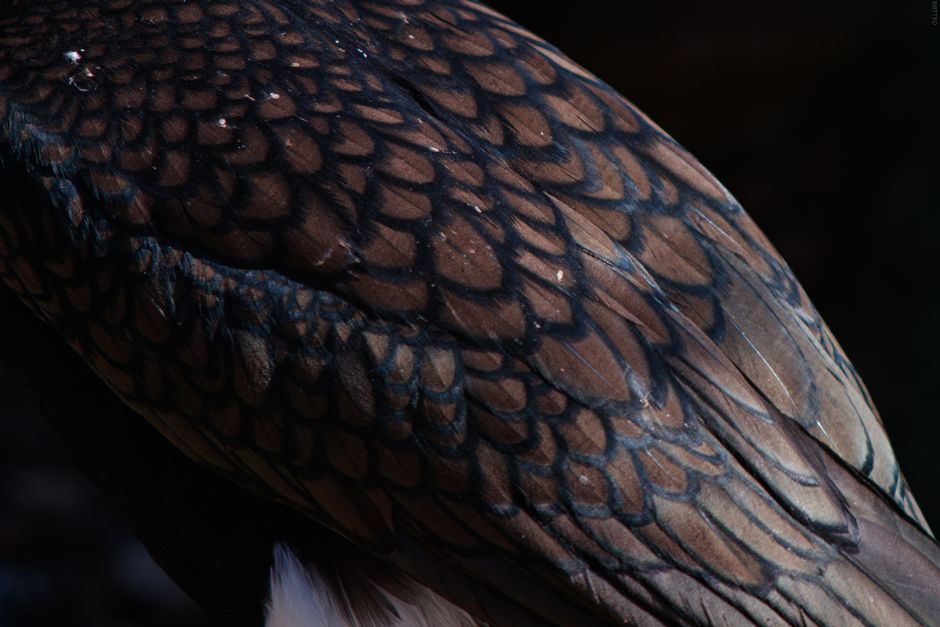
The soul of a bird photo lives in the details of the feathers. A quality app must offer sophisticated sharpening tools that don’t just add “crunch” to the whole image but allow you to enhance bird feathers in editing specifically. This often requires “masking,” where you apply sharpness only to the bird while leaving the background soft.
Advanced Noise Reduction
Because birds move fast, we often shoot at high shutter speeds, which forces the ISO up. This creates “grain” or noise. The best apps use AI or advanced algorithms to strip away this grain without smudging the delicate textures of the bird’s down. If you struggle with blurry or grainy shots, learning about sharpening bird images in post is a game-changer.
Background Removal and Cleanup
In the wild, birds rarely perch in front of a clean studio backdrop. You’ll often have distracting twigs, power lines, or “photobombing” branches. A good bird photo editing app should offer an “Object Removal” or “Heal” tool to tidy up the environment without making it look fake.
Color Enhancement and RAW Support
Birds come in every hue imaginable. To make those iridescent blues and fiery reds pop, you need a tool that handles RAW files. RAW files contain all the data captured by your DSLR or mirrorless camera sensor, giving you much more room to adjust exposure and color than a standard JPEG.
Top Desktop Software for Professional Bird Photography
For those of us who want the highest possible quality for prints or portfolios, desktop software remains the gold standard. These programs offer the processing power needed to handle 50MP files and complex AI routines.
Luminar Neo: The AI Specialist
Luminar Neo has become a favorite in the birding community because of its “Supersharp AI” and “Denoise AI” features. It reports a 9/10 satisfaction rate among users who want fast results. It’s particularly good at correcting motion blur—that slight fuzziness that happens when a bird twitches its head just as you click the shutter.
Adobe Lightroom and Photoshop: The Industry Titans
Lightroom is where most of us start. It’s excellent for managing thousands of photos and performing “global” edits like exposure and contrast. However, when you need to remove a stubborn branch overlapping a wing, you’ll want to dive into Photoshop tips for bird photos. Photoshop allows for “pixel-level” editing that AI sometimes struggles with.
Human vs. AI Editing: The Great Debate
While AI tools like Luminar Neo are incredibly fast, many professional wildlife photographers still prefer a human touch—or at least human-guided manual editing. Why? Because AI can sometimes over-process, making feathers look like plastic or creating “halos” around the bird’s beak. For those just starting, exploring beginner-friendly photo editing software can help you find a balance between automation and manual control.
| Feature | AI-Powered (Luminar Neo) | Traditional (Lightroom/Photoshop) |
|---|---|---|
| Speed | Extremely Fast | Moderate |
| Precision | Automated | Manual/High |
| Learning Curve | Low | High |
| Natural Results | Can be “over-the-top” | Highly Realistic |
Best Mobile Bird Photo Editing App Options for On-the-Go
Sometimes, you don’t want to wait until you get home to share a sighting. Mobile apps have come a long way, offering powerful tools right in your pocket.
Bird Photo Editor Pro
With over 1,000 downloads and a 4.0-star rating, Bird Photo Editor Pro is a dedicated tool for enthusiasts. It supports high-resolution exports (up to 50MP) and includes specific bird-themed overlays and filters named after species like “Falcon” or “Osprey.” It even supports RAW formats from DSLRs if you transfer them to your phone.
Specialized vs. General Apps
Specialized apps like Bird Photo Editor focus heavily on the “fun” side of editing, offering bird-themed frames and background changers. This is great for social media or creating digital greeting cards. If you are specifically using an Apple device, there are curated apps for iPhone bird photo editing that take advantage of the iPhone’s Neural Engine for quick maskings.
For those interested in specific species, we’ve even seen a rise in niche tutorials, such as editing pigeon photos on mobile, which focus on the subtle iridescent neck feathers of urban birds.
Integrating Identification Tools into Your Workflow
A modern bird photographer’s workflow starts long before the editing phase. We use digital tools to scout, identify, and track our subjects, which makes the eventual editing process much easier.
- eBird: Developed by the Cornell Lab of Ornithology, this is the ultimate scouting tool. It tells us what species are in our area and where rare birds have been spotted.
- Merlin Bird ID: This app is like having a bird expert in your pocket. You can upload a photo (even a blurry one), and it uses AI to identify the species.
By using these tools, we can better organize our metadata. Knowing exactly which species of sparrow you photographed allows you to apply more accurate color corrections. For example, a “Yellow-rumped Warbler” needs that specific “butter butt” yellow to be accurate, not neon green. If you’re new to this, checking out some beginner bird photo editing tips can help you bridge the gap between the field and the desk.
Common Mistakes to Avoid in a Bird Photo Editing App
It is very easy to get carried away with all the sliders in a bird photo editing app. We’ve all been there—you want the bird to look “epic,” and suddenly it looks like a neon cartoon.
1. Over-Sharpening
This is the most common mistake. When you push the sharpness slider too far, you get “wormy” artifacts in the feathers. The bird starts to look crunchy and unnatural. The goal should always be natural-looking edits for bird photos.
2. Unnatural Color Saturation
While we want the colors to be vibrant, over-saturating can hide the subtle details of the plumage. If the greens of the forest start glowing, you’ve gone too far.
3. Poor Composition and Cropping
No amount of editing can fix a bad composition, but clever cropping can save a “distant” shot. However, over-cropping leads to a loss of resolution. We recommend following crop and composition editing tips to ensure your bird has “room to breathe” in the frame.
4. Excessive Noise Reduction
If you turn the noise reduction up to 100%, the bird’s feathers will look like smooth plastic or wax. You want to keep a little bit of “texture” to maintain the reality of the moment.
Frequently Asked Questions about Bird Photography Tools
Can a bird photo editing app handle RAW files?
Yes, most professional-grade apps (Lightroom, Luminar Neo) and even some advanced mobile apps like Bird Photo Editor Pro can handle RAW files. This is vital for bird photography because it allows you to recover details from shadows or highlights that would be lost in a standard JPEG.
Is AI better than human editing for bird feathers?
AI is faster and great for “standard” fixes like noise and general sharpness. However, for “fine art” results, human intuition is superior. A human editor knows that a specific feather should be soft while the eye should be tack-sharp—AI sometimes blurs these distinctions.
What is the best free bird photo editing app for beginners?
For Android users, Bird photo editor and frames is a fantastic starting point. It offers basic tools like cropping, background removal, and fun stickers without a steep learning curve.
Conclusion
At Ciber Conexão, we believe that every bird photo tells a story. Whether you are using a professional suite like Adobe Photoshop or a dedicated mobile bird photo editing app, the goal is the same: to honor the beauty of the avian world.
By mastering tools like feather sharpening and noise reduction, and avoiding common pitfalls like over-saturation, you can transform a simple snapshot into a portfolio-worthy masterpiece. The best edit is the one that looks like you didn’t edit it at all.
For more deep dives into specific techniques, explore our full range of professional photo editing guides. Happy birding!
