
Why Every Close-Up Photographer Needs to Understand Closeup Focus Stacking Crop
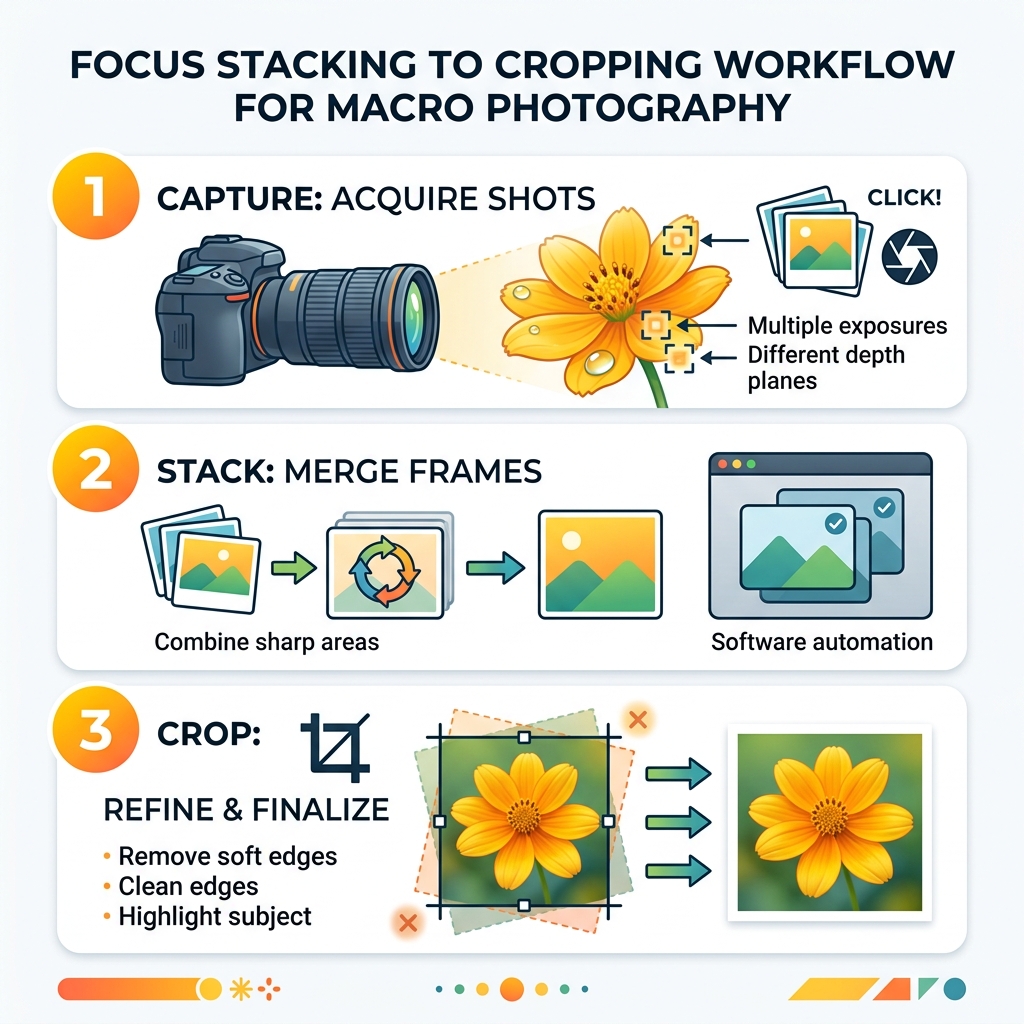
Closeup focus stacking crop is a three-step workflow that solves one of the biggest problems in macro photography: getting your entire subject sharp in a single image.
Here’s the quick answer:
- Capture multiple shots of the same subject, each focused on a slightly different depth
- Stack those images in software so only the sharpest parts of each frame are combined
- Crop the final blended image to remove soft, misaligned edges from the merge process
That’s it. Those three steps can turn a blurry, partially focused close-up into a crisp, professional-looking photo.
If you’ve ever pointed your camera at a flower, insect, or small object and noticed that only a sliver of it looks sharp — even at f/16 — you’re not doing anything wrong. That’s just physics.
At close distances, depth of field shrinks to just a few millimeters. Even stopping down to a narrow aperture won’t fix it. In fact, going too small (like f/22) actually softens your image through a phenomenon called diffraction.
Focus stacking is the solution photographers use to work around this optical limit. And the final crop step is what makes the result look clean and intentional — not like a rushed composite.
This guide walks you through the entire process, step by step, so you can apply it even if you’re new to editing.
Why Focus Stacking is Essential for Close-Up Photography
When we dive into the tiny, we quickly realize that the standard rules of photography seem to break. In most genres, an aperture of f/11 provides a generous area of sharpness. In macro photography, however, the depth of field can be as thin as a few millimeters, even at f/9.0 or f/11.
If you are photographing a small insect, you might find that the eyes are sharp, but the legs and wings are a blurry mess. This is where a closeup focus stacking crop becomes your best friend. By taking a series of photos at different focus points, we can “slice” the subject into sharp segments and stitch them together later.
One might think the solution is simply to stop the lens down to f/22 or f/32. Unfortunately, this introduces the “diffraction limit.” Beyond a certain point, the light waves interfere with each other as they pass through the tiny aperture opening, actually making the entire image softer. To get everything sharp, we need to stay in the “sweet spot” of the lens (usually f/5.6 to f/8) and use stacking to build our depth. For more on how aperture affects different styles of photography, check out our Aperture Guide: Bird Photography.
Overcoming Optical Limitations
At a 1:1 macro magnification, the physics of light are unforgiving. The closer we get to a subject, the shallower the depth of field becomes. Even at a 1:64 scale (like photographing a toy car), f/16 is often insufficient to get the front bumper and the rear tires sharp at the same time.
Focus stacking allows us to achieve high subject isolation—keeping that beautiful, creamy background—while ensuring the subject itself is crisp from front to back. It’s about having your cake and eating it too. While we often discuss these settings in the context of wildlife, the principles remain the same; you can learn more in The Ideal Aperture for Birds and How to Use It.
Setting Up Your Camera for a Closeup Focus Stacking Crop
Consistency is the secret sauce of a successful stack. If your exposure or white balance shifts between frames, the software will struggle to blend them, leading to weird flickers or “seams” in the final image.
We recommend setting your camera to full Manual (M) mode. This includes:
- Manual Exposure: Lock your shutter speed and aperture.
- Manual ISO: Keep it low (ISO 100 or 200) to minimize noise.
- Manual White Balance: Don’t leave it on “Auto,” or the colors might shift if a cloud passes by.
- Manual Focus: You will be the one moving the focus point, not the camera’s autofocus system.

Using a tripod is non-negotiable for high-quality stacks. Even the slightest vibration can ruin the alignment. For tips on choosing the right support, see our guide on Camera Tripods for Urban Photography. For more specific settings on getting close to your subjects, visit Up Close and Personal: Camera Settings for Close-Up Bird Shots.
Using a Macro Focusing Rail for Precision
While you can turn the focus ring on your lens, a macro focusing rail is much more precise. These rails allow you to move the entire camera and lens assembly forward in tiny, measured increments.
In many setups, one full revolution of the rail’s crank equals exactly 1 millimeter of travel. For a typical macro subject, you might take a shot every 1 or 2 millimeters. This ensures that the sharp “slices” overlap sufficiently. Without enough overlap, you’ll end up with “soft bands”—strips of blur sandwiched between sharp areas.
Managing Focus Breathing and the Closeup Focus Stacking Crop
“Focus breathing” is a phenomenon where the focal length of a lens appears to change slightly as you adjust the focus. This makes the subject look like it’s growing or shrinking between shots.
This is exactly why the closeup focus stacking crop is so vital. When you align these images in post-processing, the software has to scale the images to match. This results in “empty” or distorted edges around the frame. We always suggest composing your shot a bit wider than you think you need. This “breathing room” ensures that when you apply your final Crop and Composition Editing Tips, you don’t lose an important part of your subject.
Step-by-Step: Capturing and Blending Your Stack
Whether you are doing this manually or using a modern camera’s automated features, the goal is the same: total coverage.
| Feature | Manual Stacking | In-Camera Focus Bracketing |
|---|---|---|
| Control | High – You decide every slice | Low – Camera automates steps |
| Speed | Slow | Very Fast |
| Equipment | Requires Rail/Tripod | Can sometimes be done handheld |
| Precision | Best for extreme macro | Best for field/nature work |
When shooting, start at the point closest to the lens. Use your camera’s “Focus Peaking” feature if available—it will highlight the sharp areas in bright colors (usually red or blue), helping you see exactly where the focus plane is sitting. Ensure you have about 30-50% overlap between shots.
Post-Processing Workflow in Photoshop
Once you have your images (let’s say a sequence of 16 frames for a 1cm subject), it’s time to head to the computer. Many photographers use Adobe Photoshop for its powerful automated tools.
- Load Files: In Photoshop, go to
File > Scripts > Load Files into Stack. - Auto-Align: Select all layers and go to
Edit > Auto-Align Layers. This fixes any small shifts or focus breathing issues. - Auto-Blend: With layers still selected, go to
Edit > Auto-Blend Layers. Choose “Stack Images” and ensure “Seamless Tones and Colors” is checked.
This process is similar to how we handle complex edits for wildlife; you can find more tricks in our Photoshop Tips for Bird Photos.
Refining the Closeup Focus Stacking Crop for Maximum Sharpness
After Photoshop finishes its magic, you’ll likely notice the edges of the frame look messy. There might be white gaps or blurry “ghost” edges where the software had to shift the pixels to align them.
This is the moment for the final closeup focus stacking crop. Use the Crop Tool to pull the edges in until only the perfectly blended, sharp area remains. This is also your chance to refine the composition, following the rule of thirds or centering the subject for impact. For more on refining your images, see Sharpening Bird Images in Post.
Troubleshooting Common Stacking Artifacts
Even with the best gear, artifacts can happen. The most common is the “halo”—a hazy, soft glow around the edges of your subject where it meets the background. This often happens because the software gets confused by the transition between a sharp foreground element and a blurry background.
Another issue is “ghosting,” caused by subject movement. If a flower petals moves in the wind between shot 4 and shot 5, the software won’t know which one to use. To prevent this, try to shoot indoors or use a “plamp” (a specialized clamp) to hold your subject steady. Understanding how to avoid these issues is a core part of Avoiding Blurry Images in Bird Photography.
Fixing Blending Errors with Layer Masks
If the auto-blend tool makes a mistake (and it will!), don’t panic. Because Photoshop uses layer masks to create the stack, you can manually paint back the sharpness.
If you see a blurry spot on a leaf, find the original layer where that spot was sharp. Add a white mask to that layer and “paint” over the blurry area in the final stack to reveal the sharp pixels underneath. This manual retouching is a pro skill that separates the amateurs from the masters. For more on cleaning up your shots, visit Removing Distractions from Bird Photos.
Frequently Asked Questions about Macro Focus Stacking
How many images are typically needed for a close-up focus stack?
It depends entirely on your magnification and the depth of your subject. For a landscape, you might only need 3 images (foreground, midground, background). However, a typical macro focus stack for a subject under 1 cm often requires 16 to 30 images to ensure full coverage. If you’re shooting something extreme like a snowflake, you might take up to 200 shots to ensure you don’t miss a single crystalline detail! Consistency here is key to Improving Clarity in Bird Shots.
Can focus stacking be done in-camera?
Yes! Modern systems like the OM System (formerly Olympus) have incredible in-camera stacking. They can combine 3 to 15 frames almost instantly. While this is great for a quick preview or social media sharing, professional results usually require dedicated external software like Helicon Focus or Zerene Stacker for more control. To see how to manage these features, check Mastering Bird Photography: Essential Camera Settings.
Why is a closeup focus stacking crop necessary after blending?
As we mentioned with focus breathing, the camera’s field of view changes slightly as the focus moves. When the software aligns these layers, it has to stretch and rotate individual frames. This leaves the perimeter of your image with “interpolation artifacts”—basically, a mess of blurry pixels. A final closeup focus stacking crop is the only way to ensure the edges of your photo are as clean and sharp as the center. For more beginner-friendly advice, see our Beginner Bird Photo Editing Tips.
Conclusion
Mastering the closeup focus stacking crop is a journey of patience and precision. It allows us to pull back the curtain on a hidden world, showing details that the human eye simply cannot perceive on its own. By combining steady capture techniques with smart editing and a final, purposeful crop, you can create images with staggering impact.
At Ciber Conexão, we believe that expert editing is the bridge between a good photo and a masterpiece. Whether you’re refining the feathers of a bird or the crystalline structure of a snowflake, the principles of composition and sharpness remain your most powerful tools.
Ready to take your editing to the next level? Explore more photography tips and start transforming your shots today!
