
Why Easy Crop and Compose Skills Transform Your Photos
Easy crop and compose is the practice of trimming your image and arranging its elements to create a stronger, more focused picture. It’s one of the fastest ways to turn a flat, cluttered photo into something that actually grabs attention.
Here’s a quick summary of the core ideas:
- Crop = remove the parts of the image you don’t want
- Compose = arrange what’s left so the subject stands out
- Rule of Thirds = place your subject off-center for a more natural look
- Aspect ratio = the shape of your final image (square, wide, portrait)
- Less is more = simpler images almost always feel stronger
Good composition is at the heart of every compelling photograph. But most people don’t think about it until after they’ve taken the shot. That’s completely fine — that’s exactly what the crop tool is for.
Modern digital cameras give you a lot of room to work with. A 20-megapixel image can lose nearly 80% of its pixels and still look sharp online. So don’t be afraid to experiment.
Whether you’re posting to Instagram, printing a photo, or just cleaning up a family picture, understanding the basics of cropping and composition will make an immediate difference — no professional skills required.
The Fundamentals of Easy Crop and Compose
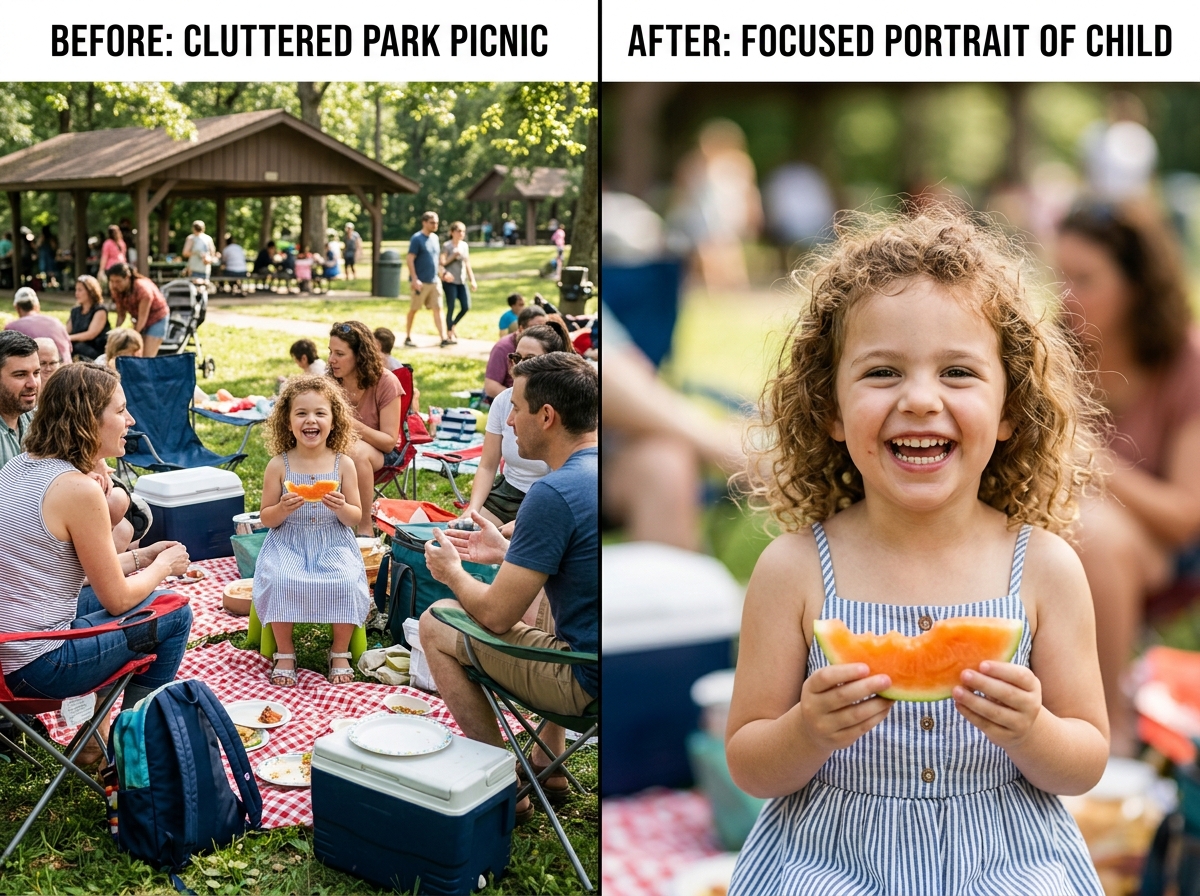
When we talk about an easy crop and compose workflow, we are essentially talking about the art of refinement. Even the most seasoned professional photographers rarely get the framing 100% perfect in-camera. There is almost always a distracting power line, a stray limb, or a bit of “dead space” that weakens the final impact.
Understanding Visual Weight
In photography, every element in your frame has “visual weight.” A bright red apple in a basket of green ones has high visual weight because your eye goes straight to it. A large, dark shadow in the corner also has weight, but it might be pulling the viewer’s attention away from your subject.
When we crop, our goal is to balance this weight. By removing heavy distractions from the edges, we allow the viewer’s eye to settle comfortably on the intended focal point. This is the cornerstone of The Ultimate Guide to Better Photo Composition, where we explore how to guide the viewer’s gaze through intentional placement.
Removing Distractions and Subject Focus
The simplest way to improve a photo is to ask: “Does this element help tell the story?” If you have a beautiful portrait of a friend but there’s a trash can visible in the background, that trash can is a “visual tax.” It costs the viewer energy to ignore it. By performing an easy crop and compose adjustment, you can zoom in past the clutter, isolating your subject and instantly making the image feel more professional and intentional.
Mastering Compositional Rules for Better Cropping
Cropping isn’t just about cutting things out; it’s about repositioning what remains. To do this effectively, we rely on time-tested guidelines that humans find naturally pleasing.
Negative Space and Leading Lines
Negative space is the “empty” area around your subject. Many beginners feel the need to fill the entire frame, but leaving room for a subject to “breathe” can create a sense of calm or importance. For example, when Composing Bird Photos with Urban Backgrounds, we often use the empty sky or a flat wall to make the bird pop.
Similarly, look for lines in your image—roads, fences, or even the edge of a building. You can crop your photo so these lines point directly toward your subject. This technique is explored further in our guide on Exploring Angles and Perspectives in Bird Photography, where we discuss how the angle of your crop can change the entire energy of the shot.
Using the Rule of Thirds for an Easy Crop and Compose
If you open the crop tool in almost any app, you’ll see a grid of two horizontal and two vertical lines. This is the Rule of Thirds grid.
- Intersection Points: Place the most important part of your photo (like a person’s eyes) where the lines cross.
- Off-Center Subjects: Placing your subject in the left or right third of the frame usually feels more dynamic than sticking them right in the middle.
- Visual Balance: Use the grid to ensure your horizon is straight. A tilted horizon is one of the most common “rookie” mistakes, but it’s also the easiest to fix with a quick rotation and crop.
The Mathematics of Subtraction in Composition
We like to think of cropping as “the mathematics of subtraction.” Instead of trying to add more “cool stuff” to a photo, try taking things away until only the essence remains.
- Simplifying Scenes: If a landscape feels “messy,” try a panoramic crop that removes a boring foreground.
- Detail Shots: Sometimes the best photo is a tiny part of the original. A photo of a whole building might be boring, but a tight crop on a single architectural curve or a reflection in a window can be stunning.
- Emotional Impact: Tight crops often feel more intimate and emotional, while wider crops feel more epic and lonely.
Technical Essentials: Aspect Ratios and Image Quality
Before you hit “save,” you need to consider the shape of your image. This is called the aspect ratio. Different platforms and print sizes require different shapes.
| Aspect Ratio | Common Use Case | Visual Feel |
|---|---|---|
| 1:1 | Instagram Feed, Profile Pictures | Balanced, focused, modern |
| 3:2 | Standard DSLR photos, 4×6 prints | Classic, traditional |
| 4:5 | Instagram Portraits, 8×10 prints | Tall, elegant, fills the phone screen |
| 16:9 | Cinematic, YouTube, TV screens | Wide, expansive, dramatic |
| 9:16 | TikTok, Instagram Stories | Vertical, immersive |
When deciding on a shape, refer to our Vertical or Horizontal Framing Tips for Bird Photography to see how orientation affects the viewer’s perception of height and scale.
Maintaining Quality During an Easy Crop and Compose
A common fear is that cropping will make an image “blurry.” While it’s true that you lose pixels when you crop, modern technology is very forgiving.
- Megapixels: If you have a 20-megapixel camera, you have about 5,400 pixels across. Even if you crop away 50% of the image, you still have plenty of resolution for a high-quality print.
- 2048px Standard: Most social media platforms (like Facebook or Instagram) resize your images to a maximum dimension of 2048 pixels anyway. As long as your cropped version is larger than that, it will look perfectly sharp online.
- Non-destructive Editing: Always use software that supports non-destructive editing (like Lightroom or modern mobile “Edit” tools). This means the app remembers your original photo, so you can always “undo” a crop later if you change your mind.
Modern Tools and AI in Photo Composition
We live in an era where easy crop and compose is becoming automated. Artificial Intelligence (AI) can now analyze your photo, identify the subject, and suggest the best possible crop based on the Rule of Thirds or Golden Ratio.
AI tools like FrameFit or Crop.photo are game-changers for people who need to process many images at once. These tools can:
- Detect Faces: Automatically center a crop on a person’s face for a profile picture.
- Content-Aware Resizing: “Stretch” the background of an image using AI so you can change a vertical photo into a horizontal one without squishing the subject.
- Smart Suggestions: Offer up to 9 different “best” crops for a single image, optimized for everything from LinkedIn banners to Instagram Stories.
For developers looking to build these features into their own apps, packages like react-easy-crop make it simple to add interactive cropping to any website. And for a quick, browser-based fix, EasyCrop offers a fast, privacy-focused way to trim images without needing to download heavy software.
Frequently Asked Questions about Cropping
Should I crop in-camera or during post-processing?
Ideally, you should try to “get it right in the camera.” This preserves the maximum amount of detail and resolution. However, we always recommend leaving a “safety margin”—shooting slightly wider than you think you need. This gives you room to straighten the horizon or adjust the composition later without cutting off important details like toes or the tops of heads.
How do I avoid over-cropping my images?
Over-cropping happens when you zoom in so far that the image becomes pixelated (grainy) or you lose the “context” of the shot. If you are cropping a bird, don’t just crop the head; keep some of the branch it’s sitting on so the viewer knows where it is. A good rule of thumb: if the final image is less than 1000 pixels wide, it might start looking soft on high-resolution screens.
What are the best aspect ratios for social media?
- Instagram Feed: 4:5 (Portrait) is best because it takes up the most vertical space on a phone. 1:1 (Square) is the classic choice.
- Stories/TikTok: 9:16 (Vertical) is mandatory.
- YouTube/Facebook Banners: 16:9 (Widescreen) works best for horizontal displays.
Conclusion
At the end of the day, an easy crop and compose strategy is about trusting your creative instinct. The “rules” like the Rule of Thirds are excellent starting points, but some of the most iconic photos in history broke every rule in the book.
The best way to learn is through practice. Take an old photo that you weren’t quite happy with and try five different crops. Try a square, a tight vertical, and a wide panoramic. You’ll be surprised at how a single image can tell five different stories just by changing the frame.
For more deep dives into perfecting your shots, check out our Crop and Composition Editing Tips or Explore more Photo Editing Guides at Ciber Conexão. We are here to help you see the world—and your photos—a little more clearly. Happy cropping!
