
Why Getting Your Bird Photography Focus Mode Right Makes or Breaks the Shot
The right bird photography focus mode is the single biggest factor separating a sharp, frame-worthy bird photo from a blurry disappointment. Before diving deep, here’s a quick answer:
Best focus modes for bird photography at a glance:
| Situation | Best Focus Mode |
|---|---|
| Perched, still birds | AF-S / One-Shot AF + Single-Point |
| Birds in flight (BIF) | AF-C / AI Servo + Group Area or Zone AF |
| Erratic flight paths | AF-C + Dynamic Area AF (25-point) |
| Clean sky background | AF-C + 3D Tracking or Wide-Area AF |
| Dense vegetation | Single-Point AF or manual focus |
Birds don’t wait. A heron launches from a branch in a fraction of a second. A hawk drops into a dive with no warning. By the time you react, the moment is already gone — unless your camera was already set up correctly.
Most beginners set their camera to a generic auto mode and hope for the best. The result? A perfectly sharp background and a blurry bird.
The good news: you don’t need to be a technical expert to fix this. You just need to know which mode to use and when.
This guide walks you through exactly that — in plain language, with real scenarios.
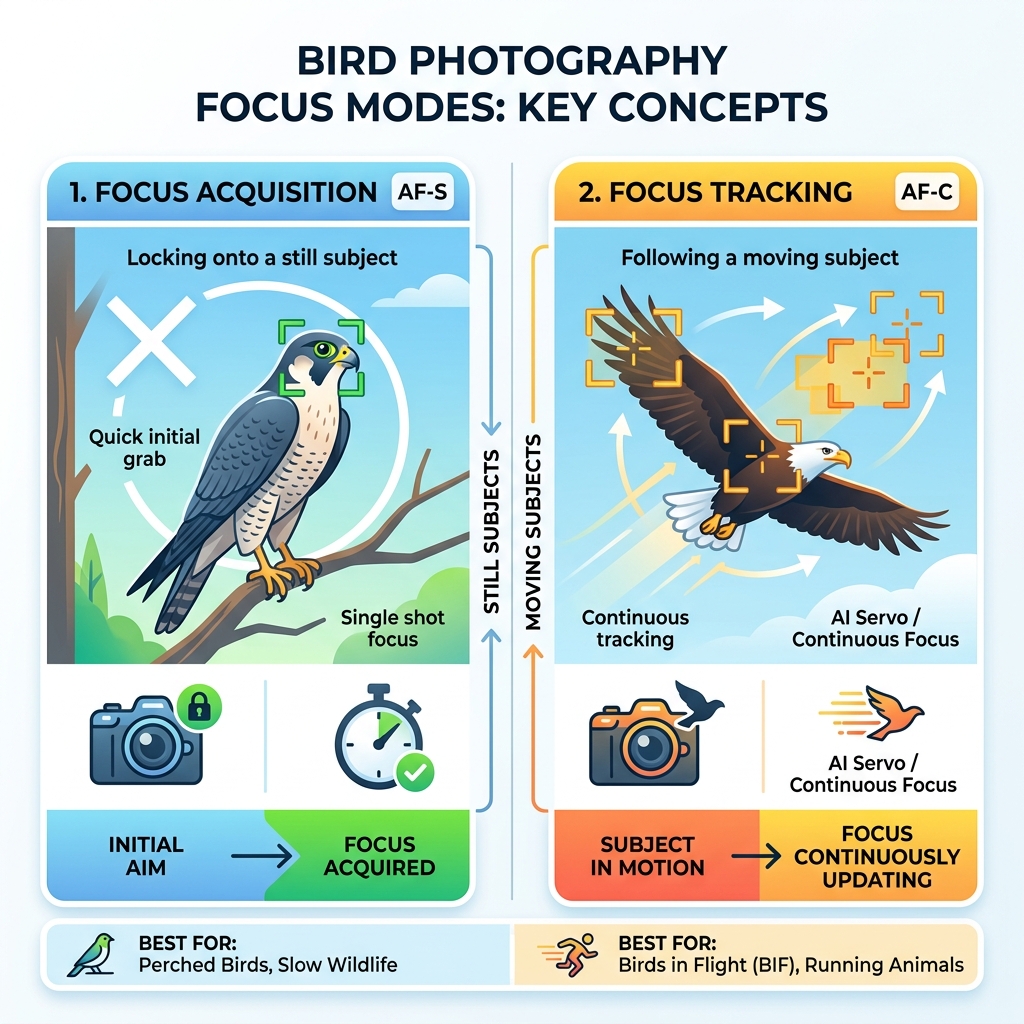
Bird photography focus mode terms at a glance:
Understanding the Core Bird Photography Focus Mode Options
To master bird photography, we first need to speak our camera’s language. While every brand likes to use its own fancy marketing terms, they all boil down to two main ways of autofocus.
The first is Single-Servo AF (Nikon/Sony: AF-S, Canon: One-Shot AF). In this mode, when you half-press the shutter, the camera locks focus once and stays there. This is perfect for a stationary owl or a duck floating calmly on a pond. However, if that bird moves even an inch toward you, the photo will be out of focus because the camera isn’t “watching” the movement.
The second, and most important for action, is Continuous-Servo AF (Nikon/Sony: AF-C, Canon: AI Servo). This is the gold standard bird photography focus mode for anything with wings. In AF-C, the camera continuously recalculates the distance to the subject as long as you hold the button. Modern systems are even smart enough to use “predictive tracking,” calculating where the bird will be a millisecond from now based on its current speed.
| Feature | AF-S / One-Shot | AF-C / AI Servo |
|---|---|---|
| Best For | Perched birds, nests | Birds in flight, walking, swimming |
| Focus Lock | Locks once and holds | Constant adjustment |
| Priority | Focus Priority (won’t fire unless sharp) | Release Priority (fires whenever you click) |
| Accuracy | High for static subjects | High for moving subjects |
We highly recommend sticking to AF-C for about 90% of your birding. Many photographers find that avoiding blurry images in bird photography starts with simply moving away from “One-Shot” modes, which are too slow for the unpredictable nature of wildlife.
Choosing the Right AF Area for Different Scenarios
Selecting the right focus mode tells the camera how to focus; selecting the AF area tells it where to look. If you leave your camera on “Auto Area,” it will likely focus on the closest thing it sees—which is usually a stray branch or a blade of grass rather than the bird’s eye.

The key is to match the size of your focus “target” to the difficulty of the movement. A tiny target is precise but hard to keep on a flying bird. A large target is easy to keep on the bird but might accidentally grab the background.
Single-Point Bird Photography Focus Mode for Perched Subjects
When a bird is sitting still, precision is everything. You want the eye to be tack-sharp. In these cases, we use Single-Point AF. This allows you to place one specific focus point exactly over the bird’s eye.
Using the center focus point is often a smart move because, on most DSLR and mirrorless cameras, the center point is the most “cross-type” sensitive, meaning it finds focus faster in low light. Once you lock focus on the eye, you can slightly recompose your shot for a better artistic balance. Just be careful with a shallow depth of field; if you move too much, the eye might slip out of focus. For more on the basics, check out our beginners guide to bird photography key settings.
Group Area and Zone AF for Birds in Flight
Trying to keep a single tiny dot on a swallow soaring at 40 mph is a recipe for frustration. This is where Group Area AF (Nikon) or Zone AF (Canon/Sony) saves the day.
Instead of one point, the camera activates a cluster of points (usually 5 to 9 in a cross or square pattern). The camera’s “brain” is programmed to prioritize the closest subject within that cluster. This is a game-changer for capturing swift movements in bird in flight photography.
Why is Group AF better than full-area auto?
- Acquisition Speed: It finds the bird faster because it has a larger “net” to catch it.
- Background Resistance: Because the area is still somewhat small, it’s less likely to accidentally lock onto a distant mountain or tree line.
- Reliability: It is widely considered the “go-to” setting for professional birders using DSLRs like the Nikon D850 or D500.
Advanced Tracking: Dynamic Area vs. 3D Tracking
As you get more comfortable, you might want to experiment with how the camera handles erratic movement—like a raptor twisting and turning through a forest.
Dynamic Area AF (D-25, D-72, or D-153 on Nikon) works by having you pick a primary focus point. If the bird briefly moves away from that point, the surrounding points act as a backup to keep the subject sharp. In our experience, the 25-point dynamic mode is the “sweet spot.” Using 153 points can actually slow the camera down because it’s trying to process too much data at once.
3D Tracking (or Real-Time Tracking on Sony) uses color and pattern recognition to “stick” to a bird. If you focus on a bright red cardinal, the camera will try to follow that red splash across the frame.
- When it works: Against a plain blue sky or a solid green field.
- When it fails: In a “busy” environment like a forest where the colors of the leaves match the bird. The camera will often get confused and “hunt,” moving the focus back and forth fruitlessly.
Mastering Back-Button Focus and Custom AF Settings
If you want to shoot like a pro, you need to stop using the shutter button to focus. This sounds crazy at first, but hear us out.
Back-button focus involves reassigning the autofocus function to a button on the back of the camera (usually labeled AF-ON).
- Your thumb handles the focusing.
- Your index finger handles only the clicking.
This allows you to keep your camera in AF-C mode permanently. If the bird is perched, you tap the AF-ON button to focus and release it—effectively “locking” the focus like AF-S. If the bird takes flight, you simply hold the button down to track it. It gives you the best of both worlds without ever having to flip a switch.
Optimizing Your Bird Photography Focus Mode Sensitivity
Deep in your camera’s “Custom Settings” menu, you’ll find options for AF Tracking Sensitivity (sometimes called “Lock-on” or “Subject Switching”).
- Sticky/Delayed (High Setting): This tells the camera, “If something (like a tree trunk) briefly gets between me and the bird, don’t switch focus!” This is vital for birds flying past obstacles.
- Responsive/Fast (Low Setting): This tells the camera to switch focus immediately to anything new that enters the frame. This is better for birds that are zig-zagging rapidly.
For most BIF (Birds in Flight) scenarios, a “sticky” setting (around 3 or 4 on a scale of 5) is best. It ensures that if a wing flap covers the bird’s head for a split second, the camera doesn’t panic and focus on the clouds. Mastering these nuances is part of finding the best aperture and autofocus settings for birds.
On modern mirrorless cameras, you also have Animal Eye AF. This is the ultimate bird photography focus mode tool, as the camera uses AI to specifically find the bird’s eye and stick to it like glue, regardless of how the bird moves.
Supporting Exposure Settings for Sharp Results
Even the best bird photography focus mode can’t save a photo if your shutter speed is too slow. Focus makes the image “clear,” but shutter speed makes it “sharp” by freezing motion.
To get the most out of your AF system, we recommend these “baseline” settings:
- Shutter Speed: 1/2000s or faster for small, fast birds. You can drop to 1/1250s for larger, slower birds like herons.
- Aperture: Don’t always shoot “wide open” (like f/4). Stopping down to f/6.3 or f/7.1 gives you a slightly deeper “zone” of focus, which acts as a safety net if your AF is off by an inch.
- ISO: Use Auto ISO. In bird photography, light changes fast as a bird moves from sun to shadow. Let the camera handle the ISO so you can keep your shutter speed high.
- Burst Mode: Always use your camera’s highest “Continuous High” frame rate. Taking 10-20 shots in a single second significantly increases your chances of getting one where the focus is perfect and the wing position is beautiful.
For a deeper dive into these mechanics, see our guide on mastering camera settings for bird photography.
Frequently Asked Questions about Bird Autofocus
When should I use manual focus instead of autofocus?
While modern AF is incredible, it’s not magic. Manual focus is your best friend when:
- The bird is behind thick brush: The AF will keep hitting the branches. Switch to manual and use Focus Peaking (which highlights sharp edges in color) to “punch through” the leaves.
- Pre-focusing on a nest: If you know a bird is going to land in a specific spot, focus there manually and wait.
- Extreme low light: When the camera “hunts” (moves back and forth without locking), your eyes are often more reliable.
How do I prevent my camera from locking onto the background?
This is the most common frustration in birding. To fix it:
- Use a Focus Limiter: Most telephoto lenses have a switch that limits the focus range (e.g., 5m to Infinity). This prevents the lens from searching all the way down to its minimum focus distance.
- Pump the Focus: If the camera locks on the background, let go of the focus button and press it again while aiming at a high-contrast part of the bird (like the wing edge).
- Smaller AF Area: If you’re using a massive 153-point zone, switch back to Group or Single-Point to “force” the camera to look at the bird.
What is the best focus mode for mirrorless bird photography?
Mirrorless has changed the game. The best setup for cameras like the Sony A1, Canon R5, or Nikon Z9 is:
- Subject Detection: Set to “Animal” or “Bird.”
- Wide-Area (Large): This allows the AI to look at a huge part of the frame.
- Eye-Priority AF: Once the AI finds the bird, it will automatically zoom in on the eye.
Conclusion
Mastering your bird photography focus mode takes practice, but the rewards are worth every missed shot. Whether you are using a DSLR like the Nikon D850 or the latest mirrorless tech, the principles remain the same: understand your subject’s movement, choose the right “target” size, and don’t be afraid to take control of your AF settings.
At Ciber Conexão, Hugo Andrade and our team of experts believe that great photography doesn’t end in the field. Once you’ve captured that sharp image, the right crop and composition can turn a good photo into a masterpiece.
The best way to get better? Head to a local park and practice on common birds like ducks or pigeons. They are the perfect “test pilots” for your new settings. Once you can track a pigeon in flight, you’ll be ready for that rare eagle or hawk when it finally appears.
Ready to take your skills to the next level? Improve your bird photography with expert tips and keep refining your craft!
