
Why Bird Photographers Are Turning to Lightroom Presets
Bird photography Lightroom presets are one-click editing tools that instantly apply a set of adjustments — like exposure, color, sharpness, and noise reduction — to your bird photos inside Adobe Lightroom.
Here’s a quick summary of what they do and where to find them:
| What You Need | Quick Answer |
|---|---|
| What are they? | Saved editing settings applied to photos in one click |
| Best for | Beginners who want professional results without manual editing |
| File support | RAW and JPEG |
| Works on | Lightroom Classic, Lightroom CC, Lightroom Mobile |
| Free options | Yes — Presetpedia offers 50 free bird photography presets |
| Paid options | birdpack™ (190+ presets), WILD EDITS V1 (30 presets), and more |
| Time saved | Up to 3 minutes per photo on average |
You just got back from a dawn session at the lake. You have 200 shots of a heron, a kingfisher, and a blur that might be a warbler. Now comes the part most beginners dread: editing.
Bird photography is hard enough to capture. Getting the edit right — fixing blown highlights, recovering shadow detail in dark feathers, reducing that grainy ISO noise — can take hours if you’re doing it manually, slider by slider.
That’s exactly the problem presets solve.
Instead of starting from scratch on every photo, you apply a preset and get a strong, professional-looking result in seconds. Then you fine-tune from there.
Whether you shoot a backyard sparrow or a rare kingfisher in flight, the right preset makes the difference between a snapshot and a showstopper.

Why Use Bird Photography Lightroom Presets?
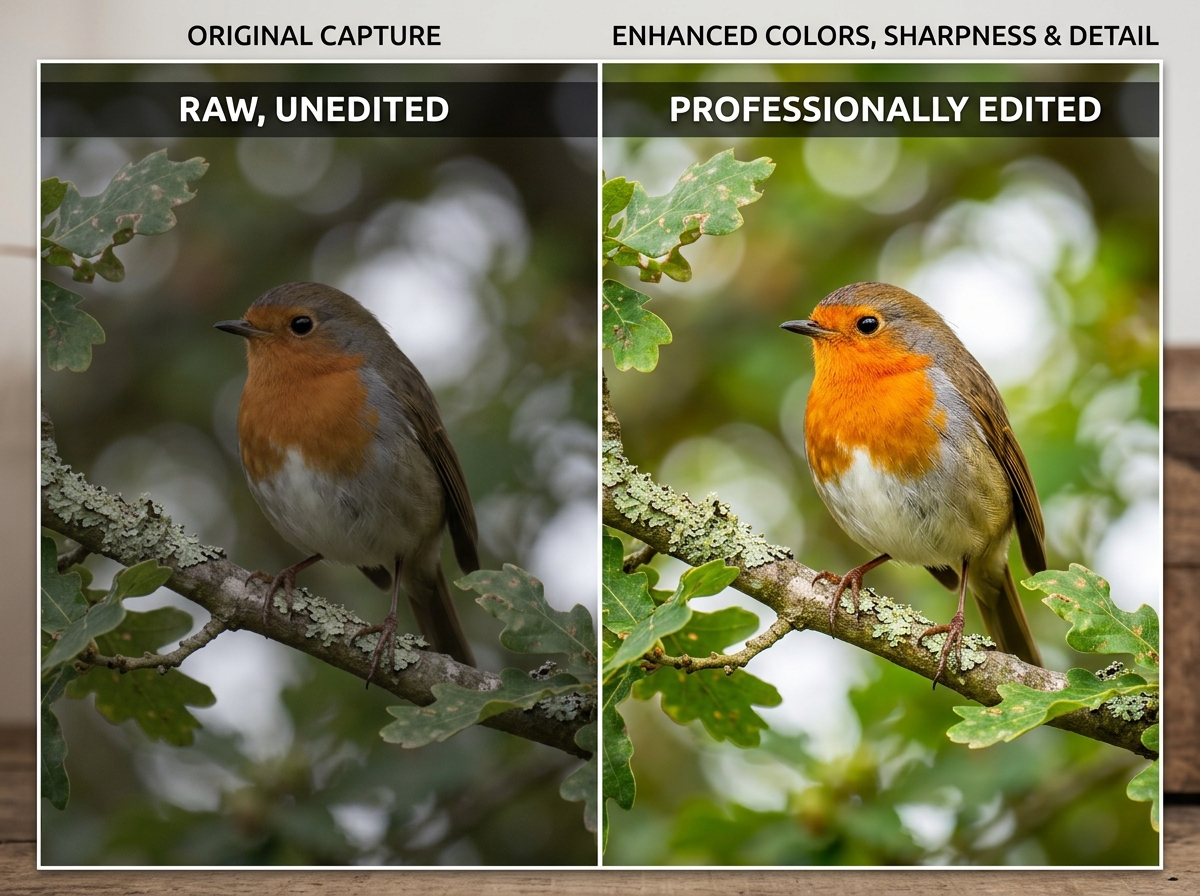
If you have ever sat in front of your computer screen with 500 photos of a feisty finch, wondering why they all look “flat,” you are not alone. We have all been there—knee-deep in feathers and frustration, tweaking sliders until our eyes cross. This is where bird photography lightroom presets become your best friend.
Efficiency and Speed
The most immediate benefit is efficiency. Statistics show that birders save an average of 3 minutes per photo when using specialized toolkits like the birdpack™. When you have a memory card full of action shots, those minutes add up to hours of saved time. Instead of manually adjusting the exposure, contrast, and highlights for every single frame, you apply a base edit and move on to the fun part: storytelling.
Consistency Across Your Portfolio
Maintaining a consistent “look” is what separates a hobbyist from a professional. If one photo in your gallery is bright and airy while the next is moody and dark, your portfolio can feel disjointed. Presets act as a “style anchor,” ensuring that your series of shots—whether they are of a heron by the pond or an eagle in the sky—share a cohesive aesthetic. For more on this, check out our beginner bird photo editing tips.
A Professional Starting Point
Presets aren’t just for “cheating” the edit; they are educational tools. By applying a preset and looking at which sliders moved, you can reverse-engineer how a professional handles shadows on a bird’s underbelly or how they sharpen delicate feather textures. It’s a fantastic way to learn the ropes within the photo editing category.
Versatility and Compatibility
Modern presets are incredibly flexible. Most professional packs are compatible with both RAW and JPEG files. While RAW files offer the most data for recovery, high-quality presets can still breathe life into JPEGs. Furthermore, they sync across Lightroom Classic, CC, and the Mobile app, allowing you to edit that stunning hawk shot while you’re still on the bus ride home from the field.
Essential Styles for Every Avian Scenario
Not every bird photo requires the same “vibe.” A bright, tropical parrot needs a different touch than a mysterious owl in a dark forest. Here are the primary styles we recommend having in your toolkit.
Natural Presets
These are the “bread and butter” of wildlife photography. They aim to preserve the true-to-life essence of the scene. Natural presets typically make subtle adjustments: a tiny boost in exposure (+0.15), a touch of contrast (+5), and a slight lift in the shadows (+15) to reveal detail under the wings. They are perfect for documentary-style shots where authenticity is key. You can find excellent starters in this free download of 50 Bird Photography Lightroom Presets.
Vibrant and Cinematic Presets
Sometimes, nature needs a little “Red Bull.” Vibrant presets amplify colors and contrast, making them ideal for social media where you want your subject to “pop.” Cinematic presets, on the other hand, offer a more narrative, film-inspired look. They often use “split toning”—adding a hint of yellow to the highlights and blue to the shadows—to create an epic, storytelling atmosphere.
Moody and Vintage Styles
Moody presets are “party mode” for your quiet, dramatic nature shots. They work by lowering the exposure and increasing the clarity and dehaze, turning a simple owl shot into something out of a wildlife thriller. Vintage presets offer a nostalgic, faded charm, perfect for urban garden birds or print projects where you want a softer, more evocative feel.
| Preset Style | Best Lighting | Target Species | Key Adjustment |
|---|---|---|---|
| Natural | Soft, overcast light | Songbirds, Waterfowl | Shadow recovery |
| Vibrant | Bright daylight | Parrots, Hummingbirds | Saturation/Vibrance boost |
| Moody | Dawn/Dusk, Forest | Owls, Birds of Prey | Exposure reduction/High contrast |
| Cinematic | Golden Hour | Birds in flight | Split toning (Warm/Cool) |
| Vintage | Harsh or Flat light | Urban birds, Sparrows | Grain and Matte finish |
Advanced Editing with Adaptive Technology
The world of editing changed recently with the introduction of “Adaptive” presets. In the past, a preset applied the same settings to the entire photo. If you boosted the brightness, the sky got brighter along with the bird.
The Power of AI and Adaptive Bird Photography Lightroom Presets
Adaptive presets use Adobe’s Artificial Intelligence to identify the subject (the bird) and the background separately. For example, the WILD EDITS V1 pack includes 15 adaptive presets with built-in smart masks.
When you click the preset, Lightroom automatically:
- Selects the Subject: Enhances feather texture, lifts shadows on the bird, and adds “eye pop.”
- Selects the Background: Softens the background, reduces its saturation, or lowers its exposure to make the bird stand out.
This level of subject isolation used to take 20 minutes of manual brushing; now, it happens in one click. If you’re looking to take these skills further, we have plenty of photoshop tips for bird photos that dive deeper into advanced masking.
Solving Common Challenges with One Click
Bird photography is plagued by technical hurdles. We often have to shoot at high ISOs to maintain fast shutter speeds, resulting in “noisy” or grainy images.
- High ISO Noise: Modern presets often integrate with Lightroom’s AI Denoise. This allows you to clean up a shot taken at ISO 5000 without turning the feathers into a mushy blur.
- Harsh Lighting: Presets can instantly compress highlights, saving the detail in white feathers (like on an Egret) that would otherwise be “blown out.”
- Shadow Recovery: Birds often have dark underbellies because the light comes from above. Specialized presets are programmed to “lift” those specific dark tones without making the whole image look washed out.
For those just starting, using beginner-friendly photo editing software alongside these presets can flatten the learning curve significantly.
How to Install and Customize Your Workflow
Getting your bird photography lightroom presets into the software is a straightforward process, whether you are on a high-end PC or an iPhone.
Setting Up Your Bird Photography Lightroom Presets Workflow
Most presets come in .XMP format (for modern Desktop versions) or .DNG format (often used for Mobile).
- On Desktop: Open Lightroom, go to the “Develop” module, find the “Presets” panel on the left, click the “+” icon, and select “Import Presets.” Select your downloaded ZIP file, and you’re done!
- On Mobile: You usually import the .DNG files as photos, then “Create Preset” from the settings attached to those images.
- Organization: We recommend grouping your presets by “Family” or “Lighting.” For instance, the birdpack™ bundle organizes 191 presets into categories like “Bird Family,” “Moods,” and “Scenery.” This makes finding the right fix much faster.
For those capturing birds in the city, check out our guide on lightroom presets for urban birds for specific environment-based tips.
Fine-Tuning for the Perfect Finish
A preset is a starting point, not a finish line. Every photo is unique because the light is never exactly the same twice. After applying your bird photography lightroom presets, we suggest a “Three-Step Tweak”:
- White Balance: If the bird looks too blue or too yellow, adjust the “Temp” slider first. This is the most common adjustment needed after applying a preset.
- Exposure: Presets are usually designed for a “perfectly” exposed photo. If your shot was a bit dark to begin with, you’ll need to nudge the exposure slider up manually.
- The Crop: At Ciber Conexão, we believe crop and composition are the soul of the photo. Use the “Rule of Thirds” or “Golden Ratio” to give the bird “room to fly” within the frame. A professional edit is wasted on a poor composition.
Frequently Asked Questions about Bird Photo Editing
Do presets work on both RAW and JPEG files?
Yes! Most professional presets work on both. However, keep in mind that RAW files contain significantly more data. If you are trying to recover details from a very dark shadow or a very bright sky, a RAW file will give you much better results with a preset than a JPEG will.
Can I use these presets on Lightroom Mobile?
Absolutely. Most modern preset packs include .DNG files or sync via the Creative Cloud. This is a game-changer for birders who want to edit and share their finds on social media while still out in the field.
How do I stop my bird photos from looking over-edited?
The “less is more” rule applies here. If a preset looks too “heavy,” look for the “Preset Amount” slider at the top of the panel in Lightroom. You can dial back the intensity to 50% or 75% to keep the look natural. Also, be careful with the “Saturation” and “Detail” sliders—too much of either can make feathers look like plastic.
Conclusion
Mastering bird photography is a journey that doesn’t end when you press the shutter button. Editing is where you refine your vision and bring out the hidden beauty of the avian world. By using bird photography lightroom presets, you aren’t just saving time; you’re giving yourself a professional foundation to build upon.
At Ciber Conexão, our goal is to provide practical, expert advice to help you improve your skills. Whether you are struggling with high ISO noise or trying to master the perfect crop, every professional started exactly where you are now. Use these tools to experiment, learn, and ultimately, find your own unique style.
Ready to take your images to the next level? Explore more photography tips and start turning your raw captures into masterpieces today. Happy shooting!
