
Why Metering Mode for Bird Photography Can Make or Break Your Shot
Metering mode for bird photography is one of the most overlooked settings for amateur photographers — yet it directly controls whether your bird comes out perfectly exposed or lost in shadow and blown-out sky.
Here’s a quick answer to help you choose the right mode:
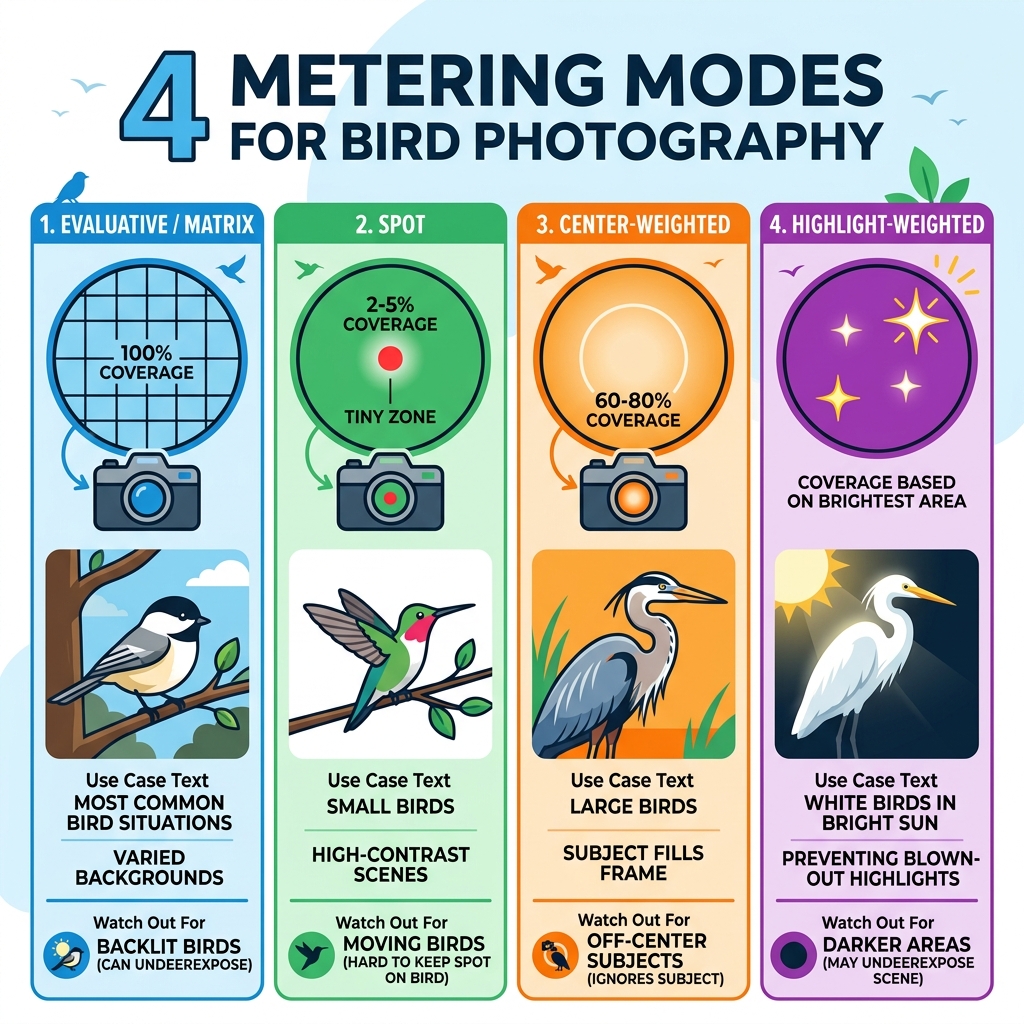
| Metering Mode | Best For | Watch Out For |
|---|---|---|
| Evaluative / Matrix | Most bird situations, varied backgrounds | Can underexpose backlit birds |
| Spot | Small birds, high-contrast scenes | Tiny 2-5% zone is hard to keep on a moving bird |
| Center-Weighted | Large birds filling the frame | Ignores subject if it’s off-center |
| Highlight-Weighted | White birds like egrets in bright sun | May underexpose darker parts of scene |
Quick tip: For most bird photographers, starting with Evaluative (Canon) or Matrix (Nikon) metering plus some exposure compensation is the most reliable approach.
Getting great bird photos isn’t just about a fast shutter speed or a long lens. Your camera’s metering system — the part that measures light and decides how bright or dark your image will be — plays a huge role.
The problem? Birds are tricky subjects. A jet-black crow against a pale sky. A bright white egret in dappled shade. A fast-moving hawk crossing from dark trees into open sunlight. Each of these scenes can fool your camera’s meter in a different way.
One experienced bird photographer put it bluntly: “The meter is the stupidest part of your camera.” That’s an extreme view — but it points to a real frustration many photographers share when their carefully framed bird shot comes back too dark or completely washed out.
In this guide, you’ll learn exactly how each metering mode works, when to use it, and how to combine it with other tools like exposure compensation and histograms to get consistently sharp, well-exposed bird photos.
Understanding Camera Metering vs. Exposure
Before we dive into the specific modes, we need to clear up a common point of confusion: the difference between metering and exposure. While we often use them interchangeably in casual conversation, they are two very different steps in the image-making process.
Metering is the act of measuring the light. In the early days of photography, cameras didn’t have built-in sensors to do this. Photographers had to carry hand-held light meters to determine the intensity of light hitting the scene. Today, every digital camera has a built-in TTL (Through-The-Lens) meter. This sensor looks at the light reflected off your subject and tells the camera’s brain how bright the scene is.
Exposure, on the other hand, is the result. It is the actual amount of light that reaches your camera sensor, determined by the “exposure triangle”: aperture, shutter speed, and ISO.
The “brain” of your camera has a bit of a quirk, though. It assumes that every scene it looks at should average out to a middle tone, specifically 18% gray. This is a standard that carries over from the film era. If you point your camera at a white swan, the meter thinks, “Whoa, that’s too bright! I need to darken this to make it gray.” The result? A dingy, gray swan. If you point it at a black crow, it thinks, “Too dark! Let’s brighten this up to gray.” The result? A washed-out, noisy crow.
Understanding this bias is the first step in our beginners-guide-to-bird-photography-key-settings. We have to learn how to tell the camera when it’s being “tricked” by the bird’s plumage or the background.

Comparing the 4 Main Metering Mode for Bird Photography
Modern DSLRs and mirrorless cameras generally offer four primary ways to measure light. Choosing the right metering mode for bird photography depends entirely on how much of the frame the bird occupies and how the light is hitting it.
| Mode | Coverage Area | How it Works |
|---|---|---|
| Evaluative / Matrix | Entire Frame | Divides the scene into zones and uses an algorithm to find a balance. |
| Spot | 2% – 5% | Measures light only in a tiny circle, usually at the center or linked to the AF point. |
| Center-Weighted | 60% – 80% | Measures the whole frame but gives much more “weight” to the center area. |
| Highlight-Weighted | Variable | Specifically searches for the brightest spots to prevent them from “clipping.” |
When we talk about mastering-bird-photography-essential-camera-settings, we emphasize that there is no “perfect” mode. Each is a tool designed for a specific problem.
Evaluative and Matrix Metering: The Smart All-Rounder
If you’re just starting out, this is likely your camera’s default setting. Nikon calls it Matrix, Canon calls it Evaluative, and Sony often calls it Multi-pattern.
This mode is incredibly sophisticated. It doesn’t just look at the light; it compares the scene against a database of thousands of images to “guess” what you’re shooting. It looks for patterns of light and dark to identify if you’re shooting a landscape or a backlit subject.
One of the biggest advantages for us birders is AF-point linkage. In many modern cameras, the evaluative meter gives extra priority to the area right under your active autofocus point. If you have your focus locked on a bird’s eye, the camera assumes that’s the most important part of the photo and tries to expose it correctly.
However, it’s not perfect. If a bird is small in the frame and the background is a very bright sky, the “smart” algorithm might still get confused and turn your bird into a silhouette. This is where our captivating-bird-photography-a-guide-to-camera-settings suggests using exposure compensation to nudge the camera in the right direction.
Spot Metering Mode for Bird Photography: Precision and Pitfalls
Spot metering mode for bird photography is often touted as the “pro” choice, but it comes with a steep learning curve. In this mode, the camera ignores 95% to 98% of the frame. It only measures the light in a tiny circle (usually 2-5% of the viewfinder).
The Precision: If you are photographing a white Great Egret against a dark, muddy bank, Evaluative metering might see all that dark mud and overexpose the bird, blowing out the delicate white feathers. Spot metering allows you to measure only the white feathers, ensuring they stay detailed.
The Pitfalls: Birds move. Fast. If your spot meter is locked to the center of the frame and the bird moves slightly to the left, your meter might suddenly be reading a dark leaf or a bright reflection on the water instead of the bird. This causes your exposure to jump wildly from shot to shot.
Furthermore, remember the 18% gray rule? If you spot meter on a white bird, the camera will try to make it gray. You actually have to overexpose (add +1 or +2 stops) when spot metering on white subjects to keep them white. It’s a bit counter-intuitive, but it’s essential for up-close-and-personal-camera-settings-for-close-up-bird-shots.
Center-Weighted and Highlight-Weighted Options
Center-Weighted Metering is the “old school” method. It looks at the whole frame but gives about 60-80% of the priority to the center. It’s more predictable than Evaluative (no hidden algorithms) but less twitchy than Spot. We find it useful when the bird is large and stays relatively centered, or when using older camera-settings-for-bird-lenses that don’t communicate as well with modern matrix systems.
Highlight-Weighted Metering is a newer feature found on many mirrorless cameras. It is designed to “protect the highlights” at all costs. It scans the scene for the brightest pixels and ensures they aren’t blown out. This is a godsend for birds with white patches (like a Bald Eagle’s head) or when shooting in harsh, midday sun. The downside? It might make the rest of the bird very dark, requiring you to lift the shadows in post-processing.
Overcoming Challenging Lighting with Exposure Compensation
No matter which metering mode for bird photography you choose, you will eventually encounter a situation that the camera simply cannot handle on its own. This is where Exposure Compensation (EC) becomes your best friend.
EC allows you to tell the camera, “I know you think this should be 18% gray, but I want it to be brighter (or darker).”
- Bright Sky / Snow: Your camera will try to underexpose. Dial in +1.0 to +2.0 EC to keep the snow white and the bird detailed.
- Dark Foliage / Deep Shadows: Your camera will try to overexpose. Dial in -0.7 to -1.3 EC to keep the background moody and prevent the bird from looking washed out.
- Backlighting: This is the ultimate test. If the sun is behind the bird, the camera will see a giant ball of fire and turn the bird into a black shape. If you want detail in the feathers, you’ll need significant positive EC.
We often compare these scenarios in our guide on capture-morning-vs-evening-birds-camera-settings-compared, as the angle of the sun drastically changes how your meter perceives the scene.
Advanced Strategies: Manual Mode and Modern Mirrorless Features
As you grow in your bird photography journey, you might find that “automated” metering modes actually get in your way. Many professionals eventually move to Manual Mode (M).
Wait, doesn’t Manual mode mean you don’t use the meter? Not quite! In Manual mode, you still see the meter scale in your viewfinder. However, you are the one making the final decision. One popular strategy is Manual Mode + Auto ISO. This allows you to set a fast shutter speed (to freeze motion) and a specific aperture (for depth of field), while letting the camera adjust the ISO to maintain the exposure you’ve set via the Exposure Compensation dial.
Modern Mirrorless Magic
The latest mirrorless cameras have changed the game with Subject Detection AF. On cameras like the Canon R5, Nikon Z9, or Sony A1, the metering system is often linked directly to the eye-detection software. The camera “knows” it’s looking at a bird and can prioritize the exposure for the bird’s face, regardless of what the background is doing.
Another vital tool is Auto Exposure Lock (AEL). If you are using a semi-auto mode like Aperture Priority, you can point your camera at a neutral-toned object (like green grass), hit the AEL button to lock that exposure, and then recompose to shoot your bird. This prevents the meter from jumping around as the bird moves across different backgrounds. For more on this, check out mastering-camera-settings-for-bird-photography.
Choosing the Best Metering Mode for Bird Photography in Flight
Birds in flight (BIF) are the “final boss” of bird photography. The background is constantly changing — from blue sky to white clouds to dark distant trees — as you pan with the bird.
If you use Evaluative/Matrix metering for BIF, your exposure will flicker as the background changes. This is why many experts recommend Manual Exposure for birds in flight. If the light hitting the bird is constant (e.g., a clear sunny day), your settings should stay the same whether the bird is over the trees or over the water.
If you must use an auto mode, Center-Weighted is often more stable for BIF than Evaluative, as it’s less likely to be “distracted” by a sudden bright cloud in the corner of the frame. We discuss these nuances further in our guide on photographing-rare-city-birds-the-role-of-camera-settings.
Practical Tips to Master Your Camera’s Metering System
You can read about metering all day, but the best way to learn is to see the data. Your camera provides two incredible tools to help you verify what the meter is doing: the Histogram and Highlight Alerts (Blinkies).
1. Trust the Histogram, Not the Screen
The image on your camera’s LCD can be misleading. If you’re standing in bright sunlight, the screen looks dark, so you might think your photo is underexposed. The histogram is a mathematical graph of the light in your photo.
- Pushed to the left: The image is too dark (underexposed).
- Pushed to the right: The image is bright.
- Touching the far right edge: You have “blown out” your highlights, meaning there is zero detail in the white areas.
2. Enable the “Blinkies”
Most cameras have a “Highlight Alert” setting. When you review a photo, any area that is completely overexposed will flash black and white. If the white head of your eagle is blinking, you need to dial in some negative exposure compensation and try again.
3. The ETTR Technique
Expose To The Right (ETTR) is a technique where you purposely make your image as bright as possible without touching the far right edge of the histogram. This captures the maximum amount of data and reduces “noise” in the shadows. You can then darken the image slightly in post-processing for a clean, professional look. This is a core part of getting-started-with-bird-photography-a-guide-for-beginners.
Frequently Asked Questions about Bird Metering
Why is my bird silhouette when shooting against the sky?
This happens because your camera’s meter sees the vast, bright sky and tries to darken it to 18% gray. Because the sky is so much brighter than the bird, the bird becomes a black silhouette. To fix this, use Evaluative metering with +1.0 to +2.0 Exposure Compensation, or switch to Spot Metering and keep the spot on the bird.
Should I use spot metering for all bird shots?
We don’t recommend it for beginners. While it’s precise, it’s very easy to “miss” the bird with that tiny spot, especially if the bird is small or moving. Start with Evaluative/Matrix and learn to use Exposure Compensation first.
How does Auto ISO affect my metering choice?
Auto ISO is a tool to achieve the exposure the meter asks for. If your meter (in Evaluative mode) decides the scene needs more light, Auto ISO will raise the sensitivity to make it happen. You can still use Exposure Compensation with Auto ISO to tell the meter to aim for a brighter or darker result.
Conclusion
Mastering the metering mode for bird photography is about moving from “taking” a picture to “creating” one. Your camera is a powerful tool, but it doesn’t have an artistic eye — it just wants everything to be a boring shade of gray. By understanding how Evaluative, Spot, and Center-weighted modes work, you can take control of the light.
At Ciber Conexão, we believe that the best gear in the world can’t replace a solid understanding of the fundamentals. Whether you’re using a top-of-the-line mirrorless body or an entry-level DSLR, these principles remain the same. Our expert, Hugo Andrade, always emphasizes that once you’ve nailed the exposure in the field, you have much more freedom to play with crop and composition during the editing phase.
Ready to take your skills to the next level? Check out our More photography tips and tutorials for deep dives into autofocus, lens selection, and the art of the perfect bird portrait. Happy shooting!
